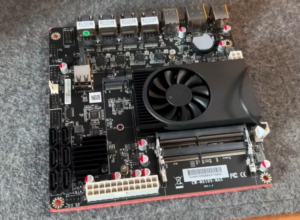
BIOS Patching Tools Guide for Mutant CPUs & Coffee Lake on Skylake/Kaby Lake Boards

Enabling mutant CPUs (or native Coffee Lake/Comet Lake desktop CPUs) on older Z170/Z270 motherboards requires BIOS modifications. The go-to tool is CoffeeTime, an automated modding utility created by the modding community.

Important Warnings

  • Risk of bricking: Always have a backup method (CH341A programmer recommended).
  • This voids warranties and is for advanced users only.
  • Results vary by motherboard — some work flawlessly, others need extra tweaks (pin mods, ME firmware, etc.).
  • Test thoroughly for stability, especially with high-TDP i9 mutants.

Main Tool: CoffeeTime

CoffeeTime (by revlaay and contributors) is the easiest automated tool for patching BIOS files. It handles microcode updates, ME adjustments, GOP/VBIOS, and Coffee Lake compatibility patches.

Latest versions are discussed on Win-Raid forums (search for “CoffeeTime” in the Coffee Lake guide thread).

Step-by-Step Guide Using CoffeeTime

  1. Backup Your Original BIOS
    • Enter your motherboard’s BIOS and use the built-in save/export function.
    • Or dump it with a hardware programmer (CH341A + SOIC clip) for safety.
  2. Download CoffeeTime
    • Check the latest release on Win-Raid Level1Techs forum (main Coffee Lake guide thread).
    • Common recent versions: 0.99 or newer with GUI.
  3. Prepare the BIOS File
    • For some boards (e.g., ASUS), you may need to convert .CAP to .bin first.
    • Optionally downgrade ME firmware to a compatible version (e.g., 11.7.x or specific corporate builds) using tools like ME Analyzer + ME Cleaner.
  4. Run CoffeeTime
    • Launch the tool (Windows-based, may need admin rights).
    • Load your stock BIOS file.
    • Select options:
      • Inject All or full patches (recommended for most).
      • Update microcodes (important for stability and AVX performance).
      • ME region adjustments.
      • Other patches (PCIe fixes, Hyper-Threading enable if needed).
    • Click apply — the tool outputs a modded BIOS file.
  5. Flash the Modded BIOS
    • Preferred safe method: Use a CH341A programmer to flash externally (no boot required).
    • In-system: Use manufacturer tools (ASUS EZ Flash, Gigabyte Q-Flash, etc.) from within the existing BIOS, or DOS/UEFI shell.
    • Some boards support USB BIOS Flashback.
  6. Hardware Considerations for Mutants
    • Pin mods (Kapton tape isolation): Often required on Z170/Z270 for 8-core+ CPUs to fix compatibility. Search for your specific board + “Coffee Lake pin mod map”.
    • Good cooling is essential — mutants can run hot.
    • Test with a known-good Skylake CPU first if possible.
  7. Post-Install Checks
    • Boot and verify CPU recognition in BIOS/Windows.
    • Monitor temps, voltages, and stability (Prime95, etc.).
    • Update chipset drivers and test features like Resizable BAR if added.

Other Useful Tools

  • UEFI BIOS Updater (UBU) by SoniX → For manual microcode/GOP updates.
    github.com
  • ME Analyzer / FIT → For inspecting and cleaning Management Engine regions.
  • CH341A Programmer → Essential hardware for safe flashing.
  • Board-specific mods (e.g., jumper wires on some ASUS boards).

Common Motherboard Examples

  • ASUS Z170 series: Generally excellent support after patching.
  • Gigabyte/MSI/ASRock: Work well but may need extra PCIe or HT fixes.

For the most up-to-date links, detailed per-board guides, and troubleshooting, visit the massive Win-Raid Forum thread: “[Guide] CoffeeLake CPUs on Skylake/KabyLake mainboards”.

winraid.level1techs.com


Final Tips

Start with a lower-power mutant (like i7-8750H/9750H) before jumping to an i9-10980HK.
Document every step and keep originals.
The community is helpful — post your exact board model and BIOS version when asking for help.
This modding scene keeps old platforms alive far beyond their official support. Good luck, and build safely! If you specify your motherboard model, I can point to more tailored advice.
Mutant CPUs: Breathing New Life into Old Skylake Motherboards with High-End i9 Power

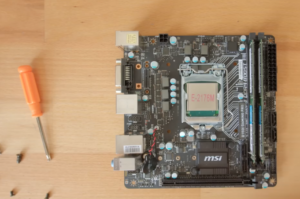
In the world of PC modding, few projects are as delightfully weird as “mutant CPUs” — laptop mobile processors repurposed with custom adapters to drop into desktop sockets. These Frankenstein creations let enthusiasts run powerful later-generation Intel CPUs, including high-core i9 models, on ancient Skylake (6th-gen) Z170 motherboards.

What Are Mutant CPUs?

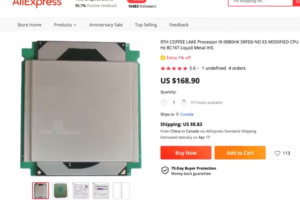
These are typically high-end mobile CPUs (like the Core i9-9880HK or i9-10980HK) taken from laptops and soldered onto a small PCB adapter. The adapter has LGA 1151 pins on the bottom, making it physically compatible with desktop sockets. A metal bracket replaces the usual IHS (integrated heat spreader) for cooler mounting.

  • Why “mutant”? They’re hybrids — laptop silicon in a desktop-friendly package. Chinese modders on sites like AliExpress popularized them.
  • Common chips: 8-core/16-thread Coffee Lake or Comet Lake-H mobile CPUs (still 14nm Skylake derivatives).

The Magic: Running Them on Skylake Boards

Official Intel rules say no — Skylake (100-series) and Kaby Lake (200-series) boards don’t support 8th/9th-gen or later CPUs due to pin differences, microcode, and ME firmware. But the modding community found workarounds:

  1. BIOS Patching — Tools like Coffeetime modify the BIOS to enable Coffee Lake support. Many users flash via a CH341A programmer.
  2. ME Firmware Tweaks — Specific Management Engine versions are needed for stability.
  3. Plug & Play (Sort Of) — Once modded, these mutants often work on Z170, B360, or even some Z370 boards.

Result? You can drop an i9-10980HK (8 cores, up to 5.3 GHz turbo) into a 2015-era Z170 board and get modern multi-core performance without buying a new platform.

Performance Payoff

These mutants deliver strong results for their era:

  • Excellent single-thread speeds (true to Skylake roots).
  • Solid multi-core for productivity, content creation, or light gaming.
  • Overclocking potential on unlocked models.

They shine in budget or retro builds where you want to reuse DDR4 RAM, PCIe 3.0 slots, and old cases. Real-world tests show the i9-10980HK rivaling or beating some newer chips in single-threaded tasks — though power/thermals depend heavily on your cooler and board VRM quality.

Pros:
  • Cheap upgrade path for old boards.
  • High-core counts on legacy platforms.
  • Fun modding project.

Cons:

  • Requires BIOS flashing skills (risk of bricking).
  • Potential stability quirks or limited features.
  • No official support — cooling and power delivery vary.
  • Newer platforms (LGA 1700+) are better for longevity.
The Bottom Line
Mutant CPUs are a testament to the creativity of the hardware community. They turn “obsolete” Skylake motherboards into surprisingly capable machines with later i9 muscle.
If you have an old Z170 board gathering dust, hunting for a mutant i9 could be the cheapest way to a high-core refresh.
Just remember: Proceed with caution, back up your BIOS, and enjoy the mad science.
Happy building! Sources include modding forums like Win-Raid, TechPowerUp, and hardware sites covering these adapters.